PSE Cars: Building IoT-connected applications (MQTT + Realtime WebSockets)
During my Master’s module Backend Development, my team and I built PSE Cars — a microservices-based web platform that simulates a connected-car ecosystem.
If you’ve ever wondered how “phone talks to car” features actually feel from the backend side, this project is basically a miniature version of that world: multiple services, an API gateway, and an event-driven backbone.
This post gives a quick overview of the full system, but it mainly focuses on what I contributed: the MyPSECar feature, including a NestJS IoT service that bridges HTTP + WebSockets to MQTT (Mosquitto), and the Next.js UI that consumes it.
The project in one picture
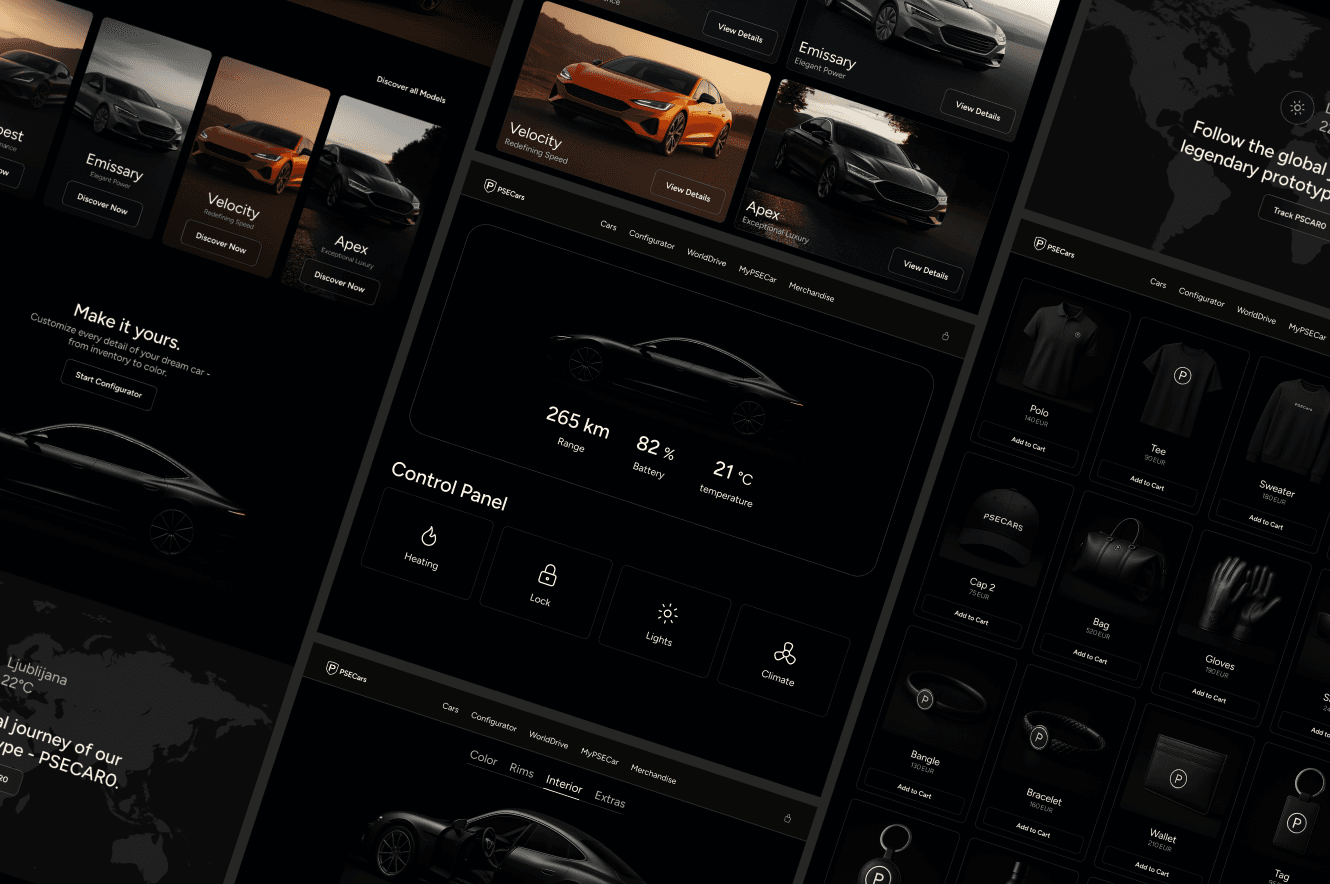
PSE Cars is a multi-page web app where users can explore cars, configure them, browse merchandise, and “drive” a simulated car around the globe.
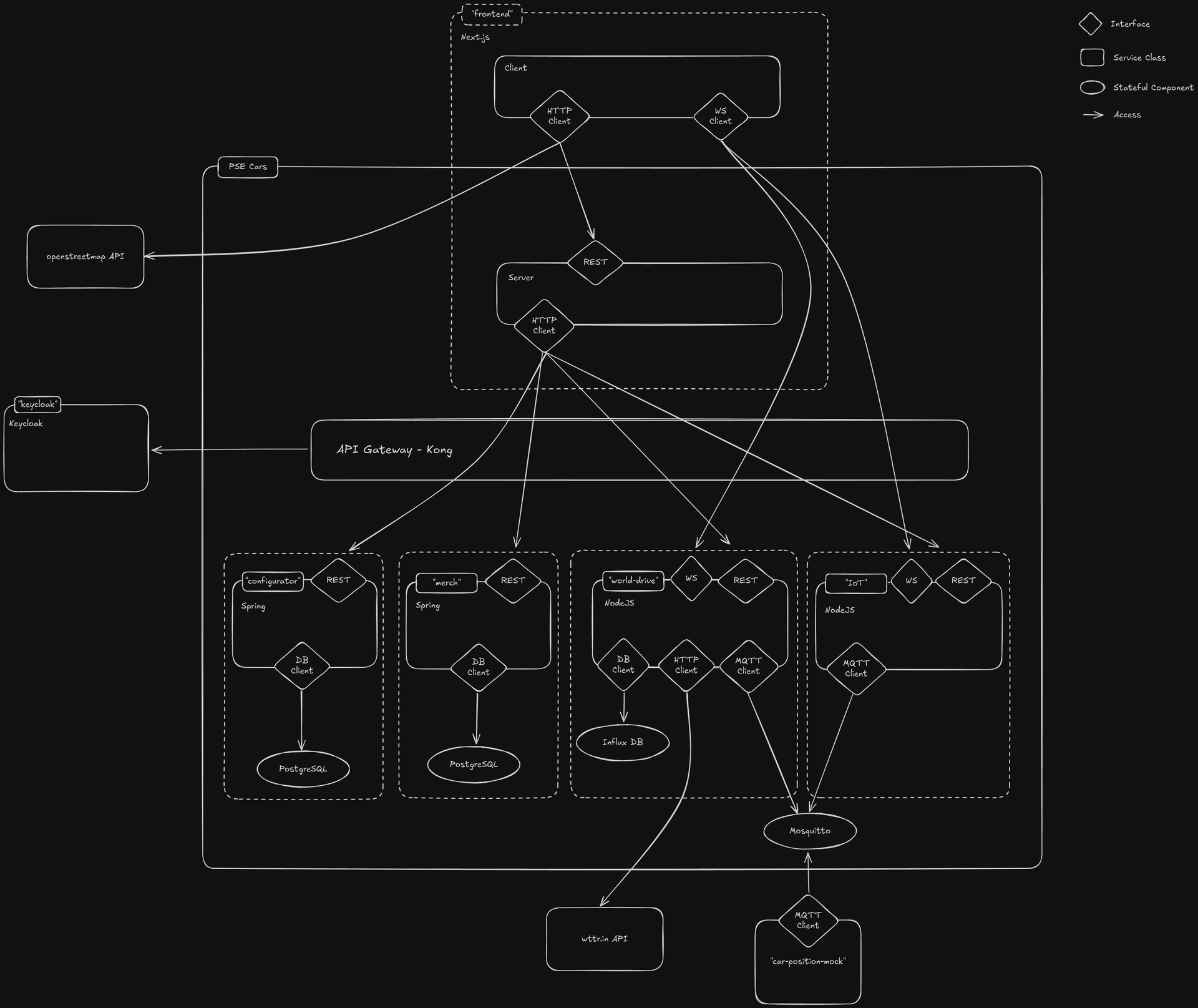
Architecturally, we went with a microservice setup, running locally via Docker Compose. The big pieces are:
- Next.js frontend as the user-facing app
- Kong as an API gateway (reverse proxy + routing)
- Keycloak as an identity provider (ready for auth integration)
- Several backend services (Spring + Node.js), and a shared Mosquitto broker for MQTT messaging
Why “MyPSECar” was fun (and not just CRUD)
I didn’t want the MyPSECar page to feel like a static dashboard that refreshes once in a while. I wanted it to feel like a real companion app:
You open a car page (identified by a carId), the telemetry updates continuously, you toggle controls like locking and climate, and the UI responds immediately.
To get that feeling, the backend can’t be “request/response only”. The core design idea was:
Commands go through REST, state flows back through realtime events.
That’s a common pattern in connected systems: HTTP is great for “do X”, but realtime state changes need a streaming channel. MQTT is great for device-style messaging, and WebSockets are great for browser UIs — so the job of my IoT service became bridging those worlds.
What I built: a NestJS IoT service that speaks three languages
The IoT service lives in backend/IoT/car-iot-controller. In practice it had to be three things at once:
It was also my first time using NestJS. Up to that point, my backend experience was mostly split between “backend inside Next.js” and more traditional Java services. Nest felt like a sweet spot for this project: the structure is opinionated (in a good way), dependency injection makes the service boundaries obvious, and the TypeScript-first workflow kept the whole IoT slice consistent with the frontend.
First, it’s an HTTP API:
GET /healthfor a quick sanity check (and for container health checks)GET /car/:carId/statsto fetch the current known state for a car- Dedicated endpoints for control actions:
POST /car/:carId/lock
POST /car/:carId/lights
POST /car/:carId/climate
POST /car/:carId/heating
Each takes a JSON body like { "value": true }.
I deliberately avoided a generic “publish to any MQTT topic” endpoint. That might be convenient for a demo, but it’s also a shortcut to a security disaster: if a client can pick arbitrary topics, you’ve basically handed them a remote control for your message bus. By making endpoints explicit, the allowed actions are constrained by design — and it also leaves room for future business rules (for example: “locking the car should also turn off the lights”).
Second, it’s an MQTT client:
It connects to Mosquitto using environment variables (MQTT_BROKER_URL, MQTT_USERNAME, MQTT_PASSWORD) and subscribes to car/#. Incoming messages are decoded as JSON where possible, otherwise as booleans ("true"/"false") or strings.
The topic scheme is simple but expressive:
car/{carId}/statsupdates telemetry-style datacar/{carId}/{subtopic}handles events and control state likelock,lights, etc.
There’s also an optional integration point with the WorldDrive side: if WORLD_DRIVE_MQTT_TOPIC is set, the IoT service consumes location payloads shaped like:
{ "latitude": 48.137, "longitude": 11.576 }
…and propagates those coordinates into the car state so the MyPSECar UI can show “where the car is right now”.
Third, it’s a Socket.IO WebSocket server:
The browser shouldn’t have to poll every second. Instead, clients subscribe to one car and receive pushed updates on a car-specific event channel:
- client emits
subscribeToCarwith acarId - server streams updates on
car/{carId}/stats
I implemented server-side subscription tracking, so each connected client only receives updates for the car it’s viewing.
Making it feel real: in-memory state and mocked telemetry
For the scope of a university project, the goal wasn’t perfect persistence — it was demonstrating clean service boundaries and realtime data flow.
So I modeled car state in-memory (a Map keyed by carId) and then did two things:
- Mock telemetry (battery, range, temperature) updates every second when a client is subscribed.
- Immediate UI feedback: when a control command comes in (via REST → MQTT publish), the state gets updated and pushed to the UI through WebSockets.
That combination gives the page the “alive” feeling you expect from a connected system demo: numbers move, state changes, and the UI updates without refresh.
How this integrates with the rest of the stack
One thing I liked about the overall project setup is that it feels like a real system, not a collection of isolated student exercises.
Mosquitto is defined once in a shared compose file and joined to the relevant networks, so multiple backend components can publish/subscribe.
For north-south traffic, Kong routes IoT endpoints under /api/iot:
/api/iot -> http://pse-cars-backend-car-iot-controller:3002
In the current setup, REST calls are designed to go through the gateway, while the WebSocket connection is configured to connect directly to the IoT service port via NEXT_PUBLIC_SOCKET_URL (typically http://localhost:3002). That kept realtime setup straightforward for the demo.
The UI I contributed: MyPSECar in Next.js
Even though this was a backend module, I wanted to ship an end-to-end slice that actually demonstrates the architecture.
On the frontend side, I implemented the initial Next.js setup and crafted the landing page myself in a single day. I built it the “old-fashioned” way: by hand with my Next.js + TailwindCSS skills, without relying on AI tools. It’s still one of my favorite parts of the project because it captures that feeling of momentum when you can translate a design directly into clean, responsive UI at speed.
On top of that, I implemented the MyPSECar pages to connect the UI to the realtime backend slice.
The flow is intentionally simple:
- Visiting
/my-pse-cargenerates a UUID and redirects you to/my-pse-car/[carId]. - The car page connects to Socket.IO, subscribes to that
carId, and renders telemetry updates as they arrive. - Control buttons (lock/lights/climate/heating) call Next.js Server Actions that hit the dedicated IoT REST endpoints.
For a small “wow” factor, the UI also reverse-geocodes coordinates via OpenStreetMap Nominatim and links out to Google Maps — so “car location” feels tangible.
If I had more time
Two improvements would make this feel much more production-like.
The first is auth: right now, if you know a carId, you can read and control it. The next step would be enforcing authentication/authorization through Kong + Keycloak and tying access to a user and their car.
The second is persistence: in-memory state is perfect for a demo, but a real system would keep “current state” in something like Redis and store historical telemetry elsewhere.
Running it locally
From the repository root:
docker compose up -d
Then open the UI at http://localhost and hit http://localhost/api/iot/health to see the IoT service through the gateway.
Closing thoughts
PSE Cars was a great backend-development project because it forced me to think beyond typical database CRUD patterns. The most valuable part for me was designing a clean, constrained command API while simultaneously building a realtime event stream — and wiring it into a system that looks and behaves like a “small real product”.
If you’re learning backend engineering, I can recommend building at least one thing that is event-driven and realtime. It’s the fastest way to discover the practical tradeoffs that you don’t notice when everything is request/response.